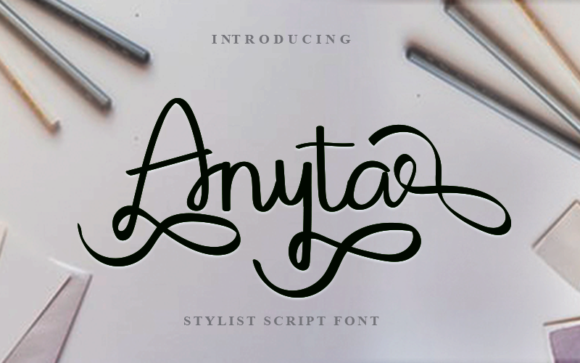
Anyta Font: A Web Designer's Review for Digital Brands
I was staring at a blank hero section for a boutique coaching website when I realized the problem wasn't the layout or the color palette. It was the typography. The client wanted something that felt personal, authentic, and warm, yet professional enough to build immediate trust. Standard sans serif fonts felt too cold, while heavy serifs were too formal. That is when I pulled up Anyta, a unique handwritten font from the Script Amp collection, to see if it could bridge the gap between human connection and digital professionalism.
Testing Anyta in a live web environment revealed exactly why this typeface is becoming a favorite for modern creators. As soon as I typed the headline "Your Journey Starts Here," the screen seemed to soften. The strokes of Anyta mimic the natural flow of a pen on paper, capturing an authentic feel that static geometric fonts simply cannot replicate. In the context of web design, where users scan pages in seconds, this emotional hook is invaluable. It stops the scroll and invites the visitor to pause.
Bringing Authenticity to Hero Sections and Landing Pages
The primary strength of Anyta lies in its ability to elevate hero sections and landing page headlines. When designing a product launch page for a small business owner, I used Anyta for the main value proposition. Placed over a soft, textured background image, the font did not compete with the visual; instead, it harmonized with it. The varying stroke widths and organic curves of this script font add a layer of sophistication that suggests high-quality craftsmanship.
In digital branding, perception is reality. Using a premium font like Anyta signals to the user that the brand values detail and aesthetics. For a portfolio homepage or a course sales page, this matters immensely. I found that when Anyta was used for the primary call-to-action headline, the perceived value of the offer increased. It transforms a generic "Sign Up" message into a personalized invitation. However, it is crucial to remember that Anyta is a display font designed for impact, not for dense information. Its charm comes from its decorative nature, making it perfect for titles but less suitable for long-form reading.
Navigating Readability and Responsive Design Challenges
One of the most critical aspects of choosing a script font for the web is ensuring it performs well across different devices. During my testing, I checked how Anyta rendered on mobile screens versus desktop monitors. On larger displays, the intricate details of the letterforms shine, offering a luxurious editorial design feel. On mobile, however, legibility can become a challenge if the font size is too small.
To maintain accessibility without sacrificing style, I recommend using Anyta strictly for headings and short phrases. When scaling down for mobile viewports, the kerning and ligatures need careful adjustment. If the letters are too tight, the organic loops of the handwritten font can blur together, causing friction for the user. A good rule of thumb is to ensure the x-height remains prominent even on smaller screens. Additionally, when placing Anyta over image overlays, always include a subtle drop shadow or a semi-transparent backing to ensure contrast ratios meet accessibility standards. This ensures that the beauty of the typeface does not come at the cost of readability.
Strategic Font Pairing for a Cohesive Brand Identity
No great web design relies on a single typeface. To make Anyta work effectively in a full-page layout, strategic font pairing is essential. Because Anyta is a highly expressive script font, it needs a partner that provides structure and stability. In my recent projects, I paired Anyta with a clean, neutral sans serif font for body copy and navigation menus. This combination creates a beautiful visual hierarchy: the Anyta headlines draw the eye with their personality, while the sans serif text guides the user through the content with clarity.
For brands aiming for a more traditional or editorial look, pairing Anyta with a simple serif font can also yield stunning results. This approach works particularly well for wedding planning websites, literary blogs, or lifestyle magazines. The contrast between the fluid, modern typography of Anyta and the classic elegance of a serif body font creates a sophisticated brand identity. It is important to avoid pairing Anyta with other decorative or script fonts, as this often leads to visual noise and a cluttered interface. Let Anyta be the star, and let your secondary font handle the heavy lifting of communication.
Technical Considerations for Commercial Web Projects
Before integrating Anyta into a live website or client project, there are several technical factors to consider. First, verify the licensing terms. While Anyta is available for commercial use, you must ensure your license covers webfont usage, especially if you are building sites for multiple clients. Many designers overlook the difference between desktop and webfont licenses, which can lead to compliance issues later.
Next, check the file formats and performance. For modern web design, loading speed is a ranking factor. Ensure that the version of Anyta you download includes optimized webfont files (WOFF2) to minimize load times. Heavy font files can slow down your site, negatively impacting user experience and SEO. Also, take advantage of any included alternates, swashes, or ligatures. These features allow you to customize specific words within a headline, adding a unique touch that reinforces the brand's distinctiveness. However, use these sparingly; too many flourishes can distract from the core message.
Ideal Use Cases and Limitations in Digital Spaces
Anyta excels in environments where emotion and connection are key drivers. It is an ideal choice for boutique online stores, coaching websites, wedding invitation platforms, and creative portfolios. In social media graphics derived from web assets, Anyta continues to perform beautifully, maintaining consistency across the brand's digital ecosystem. Whether it is a blog header announcing a new series or a promotional banner for a seasonal sale, the font adds a human touch that resonates with audiences.
However, there are clear limitations. Do not use Anyta for long paragraphs of body text, form labels, or navigation links. The decorative nature of the font makes it difficult to read in small sizes or large blocks of text. Similarly, avoid using it for data-heavy dashboards or technical documentation where precision is paramount. In these scenarios, a standard sans serif or slab serif font will serve the user better. By respecting these boundaries, you ensure that Anyta enhances your design rather than hindering usability.
Ultimately, Anyta is more than just a set of characters; it is a tool for storytelling. When applied correctly in web design, it transforms a standard webpage into an engaging, memorable experience. It bridges the gap between digital efficiency and human warmth, making it a powerful asset for any designer looking to create meaningful connections online. Whether you are launching a new brand or refreshing an existing site, incorporating Anyta can be the defining element that sets your project apart in a crowded digital landscape.